






How to choose a case for a gaming PC?
06/05/2024


The basics of choosing the perfect case for your gaming PC
When building your own personal computer, you can't do without choosing a case. This is an important element of the assembly, because it not only determines the appearance of the system unit, but also affects the cooling of components, access to ports and ease of installation. In order to know how to choose a case for a gaming PC, you should consider such basic aspects:
Compatibility with components
Size
Cooling
Design and usability
Quality of materials
Choosing the right case will allow for easy access to the selected components, making it easy to replace components when needed or easy to clean dust. In most cases, the choice of case is made after deciding on the size of the motherboard, graphics card and CPU cooler.

Optimal choice for compatibility and functionality
Initially, you should focus on the form factor of the motherboard, their sizes are standardized by manufacturers, which simplifies the assembly of the system. The most popular sizes are:
Mini-ATX
Micro-ATX
ATX
E-ATX
Having determined the size of the "motherboard", you need to take into account the length of the video card and the height of the CPU cooler. If the length of the video card is longer than the case supports, it will not fit inside, and the high height of the cooler will not allow you to cover the side panel. Therefore, it is recommended to have a margin of a few millimeters to be sure of compatibility.
Cases are divided into certain sizes, the most popular of which are SFF, Mini-Tower, Mid-Tower and Full-Tower. Their size affects the number of components that can be installed, portability and appearance. In gaming PCs, Mini-Tower and Mid-Tower are mostly used. They don't take up much space, and their size is large enough for most popular components.
Regardless of the size, the case should have good ventilation. Most cases have pre-installed fans, which saves you the trouble of buying additional fans. In those variants that do not have case fans installed, the user chooses the right number, size and quality of fans, which can improve the overall cooling system. Also, for better air circulation, attention should be paid to the presence of dust filters on the vents. They reduce the amount of dust inside the system unit and contribute to the long-term operation of components.
Some cases have built-in backlighting, glass panels for viewing internal components or special connectors for convenient connection of devices. Good design makes the appearance of the unit more attractive, so it is worth focusing on personal aesthetic preferences, but at the same time do not sacrifice better ventilation.

Quality and reliability of the enclosure
The quality of materials can have a significant impact on the longevity and appearance of the system unit. Choose models from reputable manufacturers that use high quality materials. A robust design will ensure system longevity and reliability in use. If the budget is limited, the best option may be a simple but reliable case with installed fans without unnecessary details.
Choosing a case is an important step in the process of assembling a powerful gaming system. Choose a case that suits your needs with all the details taken into account. The right choice will ensure not only efficient performance, but will also allow you to enjoy a stylish look, so if you have any difficulties, you should contact professionals of your business. Gaming Pc has a wide selection of cases from trusted manufacturers with proven performance and reliability.
Gaming PC gaming computers
Gaming Pc has a wide selection of cases from trusted manufacturers, which will give you a nice look and the best build quality.
 Free
Free shipping

Processor: Intel Core i5-12400F
Video card: GeForce RTX 3060, 12GB
RAM: 32GB (16GBx2) DDR4 3200 MHz
Motherboard: Gigabyte B760M DS3H DDR4
SSD M2:SSD M.2 1TB / Kingston NV3
Free shipping

Processor: Intel Core i5-12400F
Video card: GeForce RTX 3050, 6GB
RAM: 32GB (16GBx2) DDR4 3200 MHz
Motherboard: Gigabyte B760M DS3H DDR4
SSD M2:SSD M.2 1TB / Kingston NV3
Free shipping

Processor: Intel Core i5-12400F
Video card: GeForce RTX 3060, 12GB
RAM: 32GB (16GBx2) DDR4 3200 MHz
Motherboard: Gigabyte B760M DS3H DDR4
SSD M2:SSD M.2 1TB / Kingston NV3
Free shipping
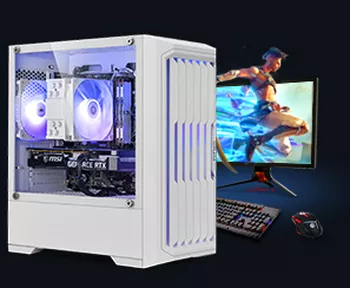
Processor: Intel Core i5-12400F
Video card: GeForce RTX 3050, 6GB
RAM: 32GB (16GBx2) DDR4 3200 MHz
Motherboard: Gigabyte B760M DS3H DDR4
SSD M2:SSD M.2 1TB / Kingston NV3
Free shipping
Processor: Intel Core i3-13100F
Video card: GeForce RTX 3050, 6GB
RAM: 16GB (8GBx2) DDR4 3200 MHz
Motherboard: Gigabyte H610M H V2 DDR4
SSD M2:SSD M.2 500GB / Kingston NV3
Free shipping
Processor: Intel Core i3-13100F
Video card: GeForce RTX 3050, 6GB
RAM: 16GB (8GBx2) DDR4 3200 MHz
Motherboard: Gigabyte H610M H V2 DDR4
SSD M2:SSD M.2 1TB / Kingston NV3
Free shipping

Processor: Intel Core i3-13100F
Video card: GeForce RTX 3060, 12GB
RAM: 32GB (16GBx2) DDR4 3200 MHz
Motherboard: Gigabyte H610M H V2 DDR4
SSD M2:SSD M.2 1TB / Kingston NV3
Free shipping

Processor: Intel Core i3-13100F
Video card: GeForce RTX 3060, 12GB
RAM: 32GB (16GBx2) DDR4 3200 MHz
Motherboard: Gigabyte H610M H V2 DDR4
SSD M2:SSD M.2 1TB / Kingston NV3
Free shipping

Processor: Intel Core i5-13400F
Video card: GeForce RTX 3060, 12GB
RAM: 32GB (16GBx2) DDR4 3200 MHz
Motherboard: Gigabyte B760M DS3H DDR4
SSD M2:SSD M.2 1TB / Kingston NV3
Free shipping
Processor: Intel Core i5-13400F
Video card: GeForce RTX 3060, 12GB
RAM: 32GB (16GBx2) DDR4 3200 MHz
Motherboard: Gigabyte B760M DS3H DDR4
SSD M2:SSD M.2 1TB / Kingston NV3